Product

From an idea to something live.

Everything Kinju does, from your first message to the finished work: the lead and its team, the board, the safety controls, and projects of any kind.
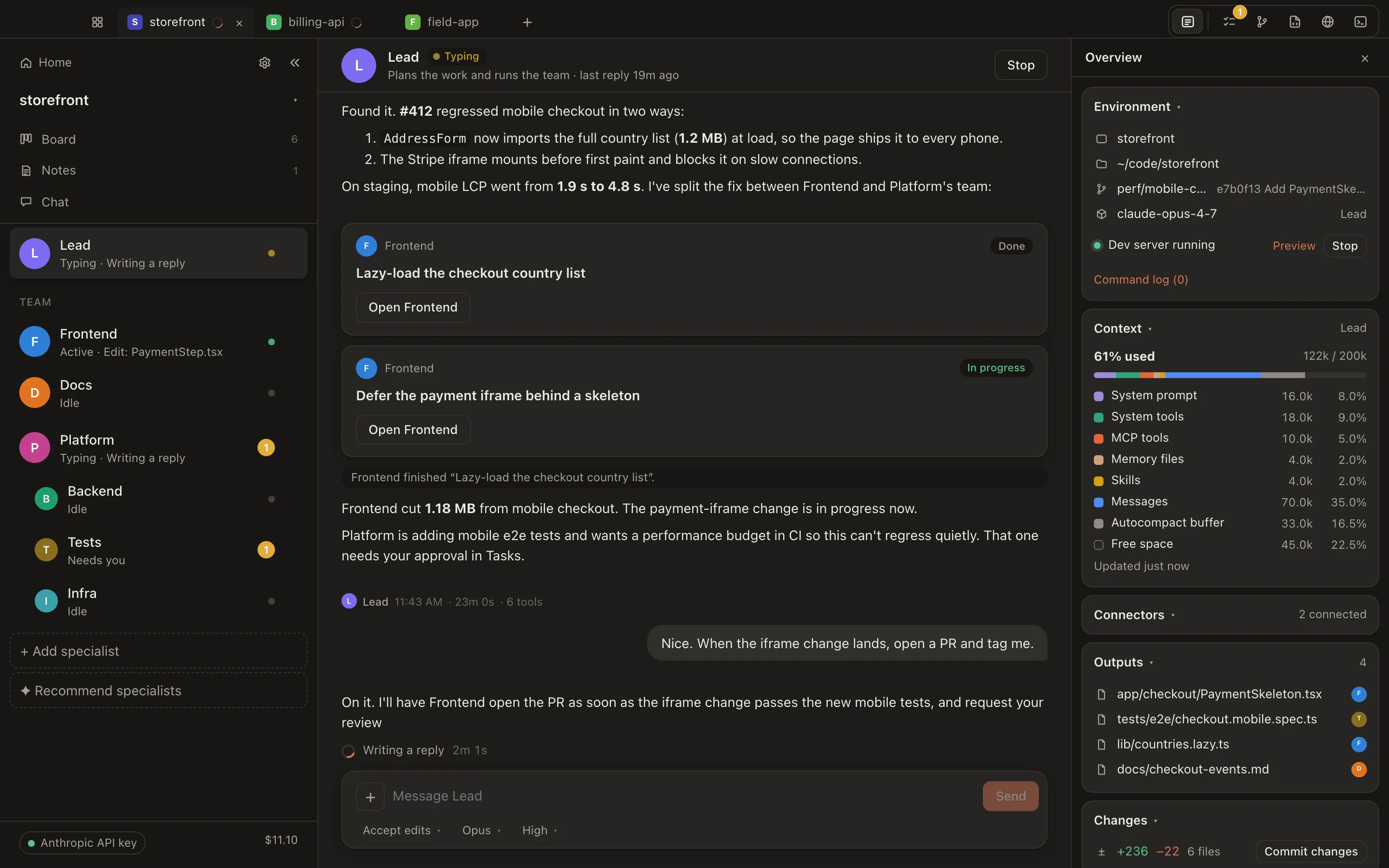
STOREFRONTCONTOUR 0.11 M The Lead agent's chat: it diagnosed a mobile checkout regression and split the fix into tasks for Frontend and a Platform sub-team, with the Overview pane showing context usage, outputs and changes.
Fig. 01The lead finds why online checkout is slow, then splits the fix between two specialists.
How it works

You describe the outcome. Kinju handles the rest.

01 · Tell

Talk to the lead

Describe what you need in plain words. It asks the business questions and turns the work into tasks.

02 · Build

The right specialist takes it

Each task has an owner and a clear goal. You can check it first, or let trusted agents start right away.

03 · Review

See it before it ships

You get a plain summary, a preview and the cost. Approve it, or undo it in one click.

Board

Every task on one board.

To do, In progress, Review, Done. Each task shows who's on it, what it has cost and where it's at, and the agents move their own tasks as they work.
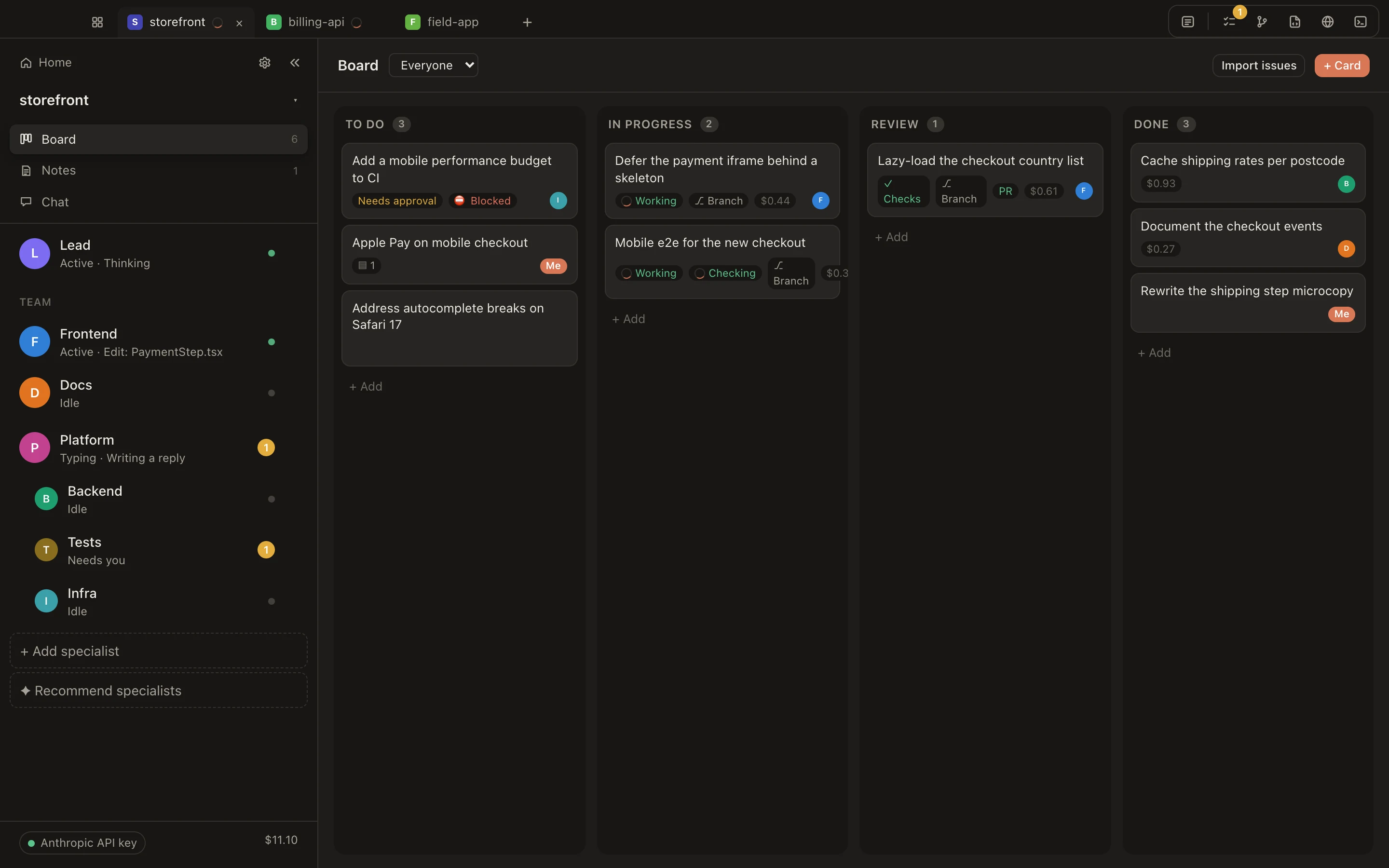
The storefront board: To do, In progress, Review and Done columns. Cards show owners, Working and Needs approval states, a Blocked chip, branch and PR chips, checks and cost.
Fig. 02Nine tasks across four columns. One waits until another is finished.
  • Drag tasks to reorder them or move them along; reassign anyone.
  • Tasks that depend on others wait their turn.
  • Filter by agent or by you, and bring in tasks from the tools you use.
Team

A team that fits the job.

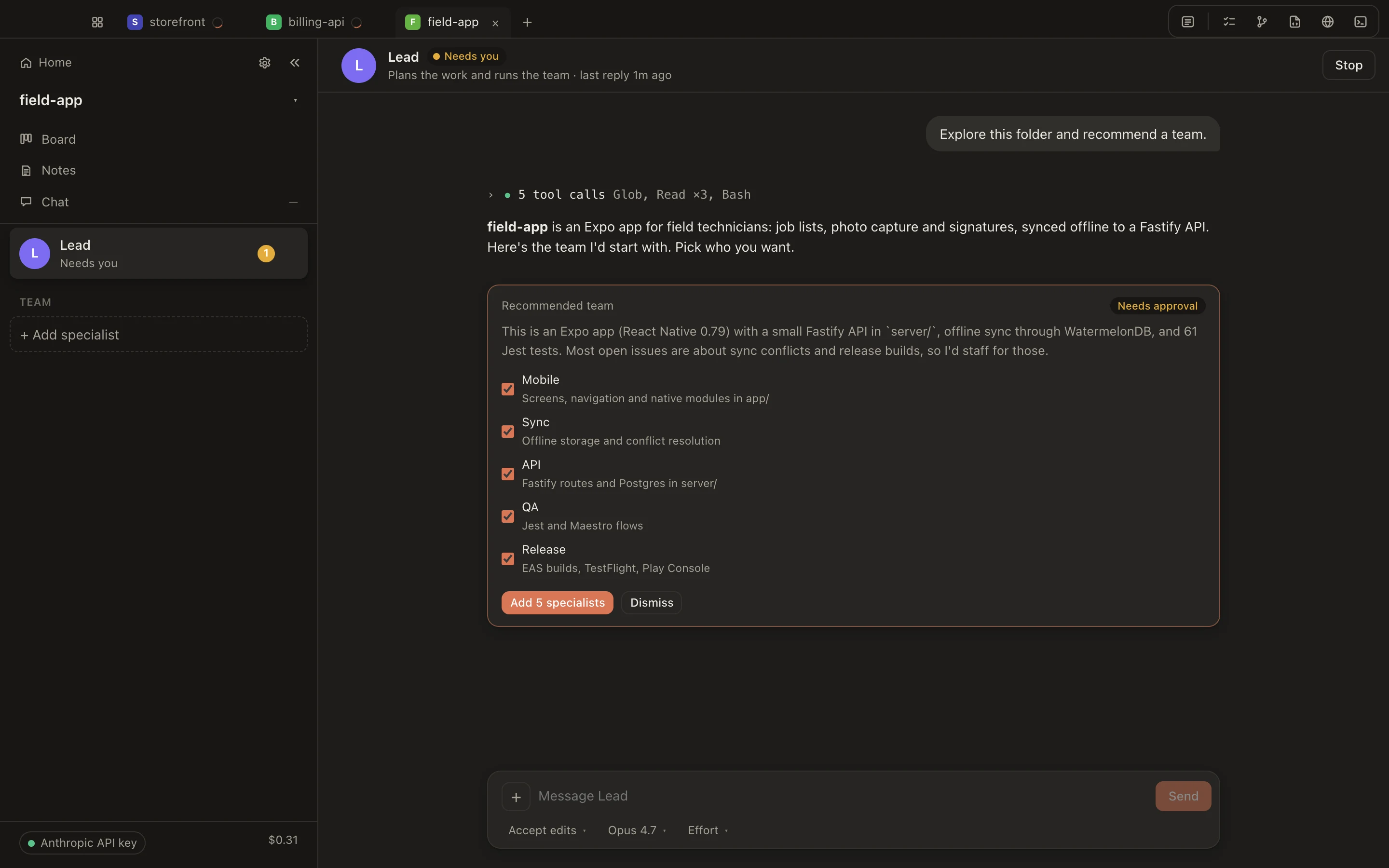
Point Kinju at a project. The lead looks it over, explains what it found, and recommends the specialists you need. Hire the ones you want.
  • Each specialist has a clear role and instructions you can read.
  • Choose how much freedom each one gets.
  • Change their instructions any time; they pick it up on the next task.
The lead's team recommendation for a new Expo project: Mobile, Sync, API, QA and Release, each with a checkbox, plus Add all and Decline.
.myclaude/agents/sync.md

          
Fig. 03On a new project, the lead reviews it and proposes a team.
Sub-leads

Big projects get their own team lead.

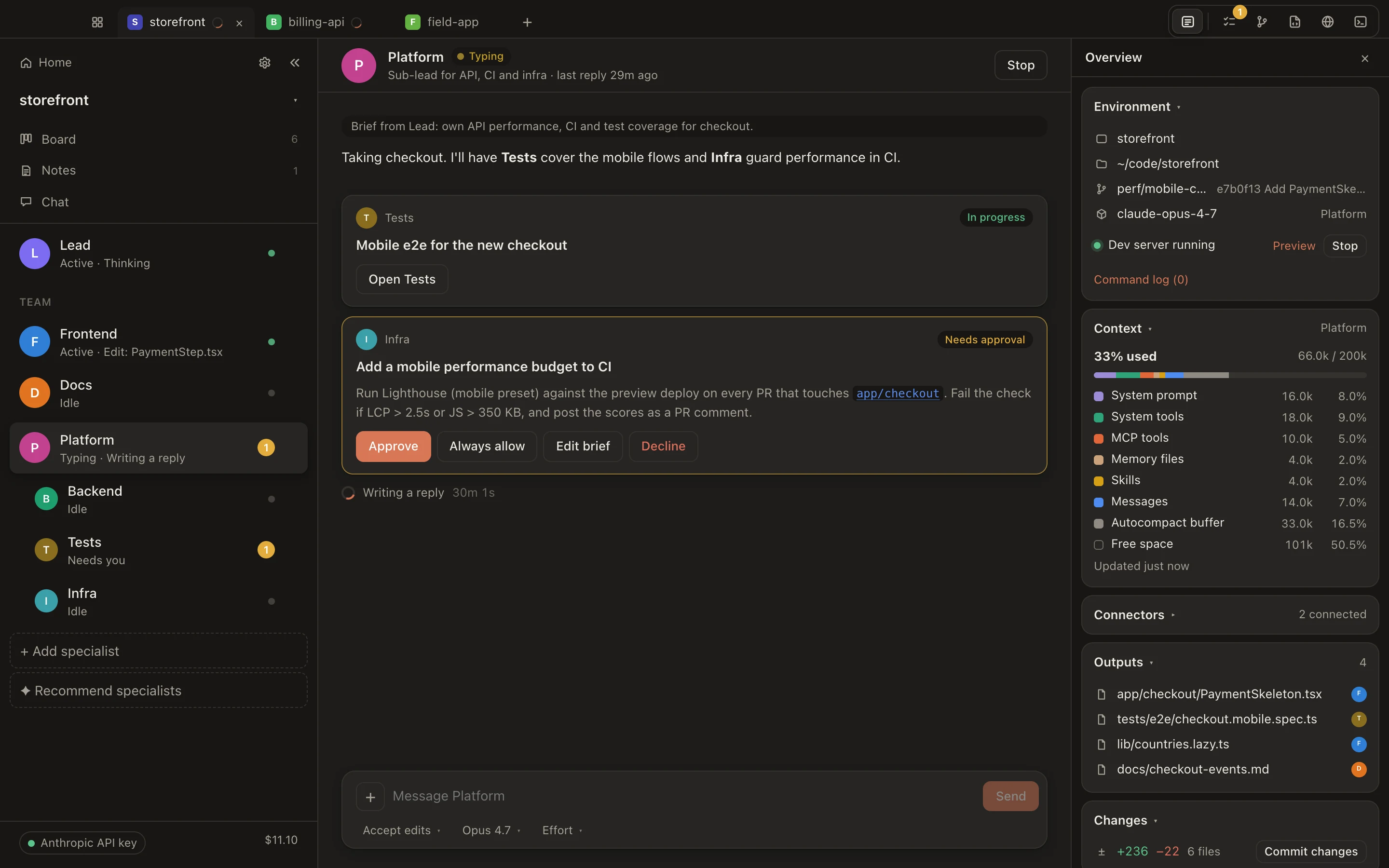
For bigger work, the lead can bring in a sub-lead with its own specialists, which keeps everyone posted and reports back when it's done.
  • See every agent's status at a glance.
  • Hover anyone to see what they're doing and what it's cost.
  • Only the main lead can hire, and you approve every addition.
The Platform sub-lead's chat, with Backend, Tests and Infra nested under it in the sidebar.
Fig. 04A platform lead runs three specialists and reports back.
Access

Decide how much freedom each agent gets.

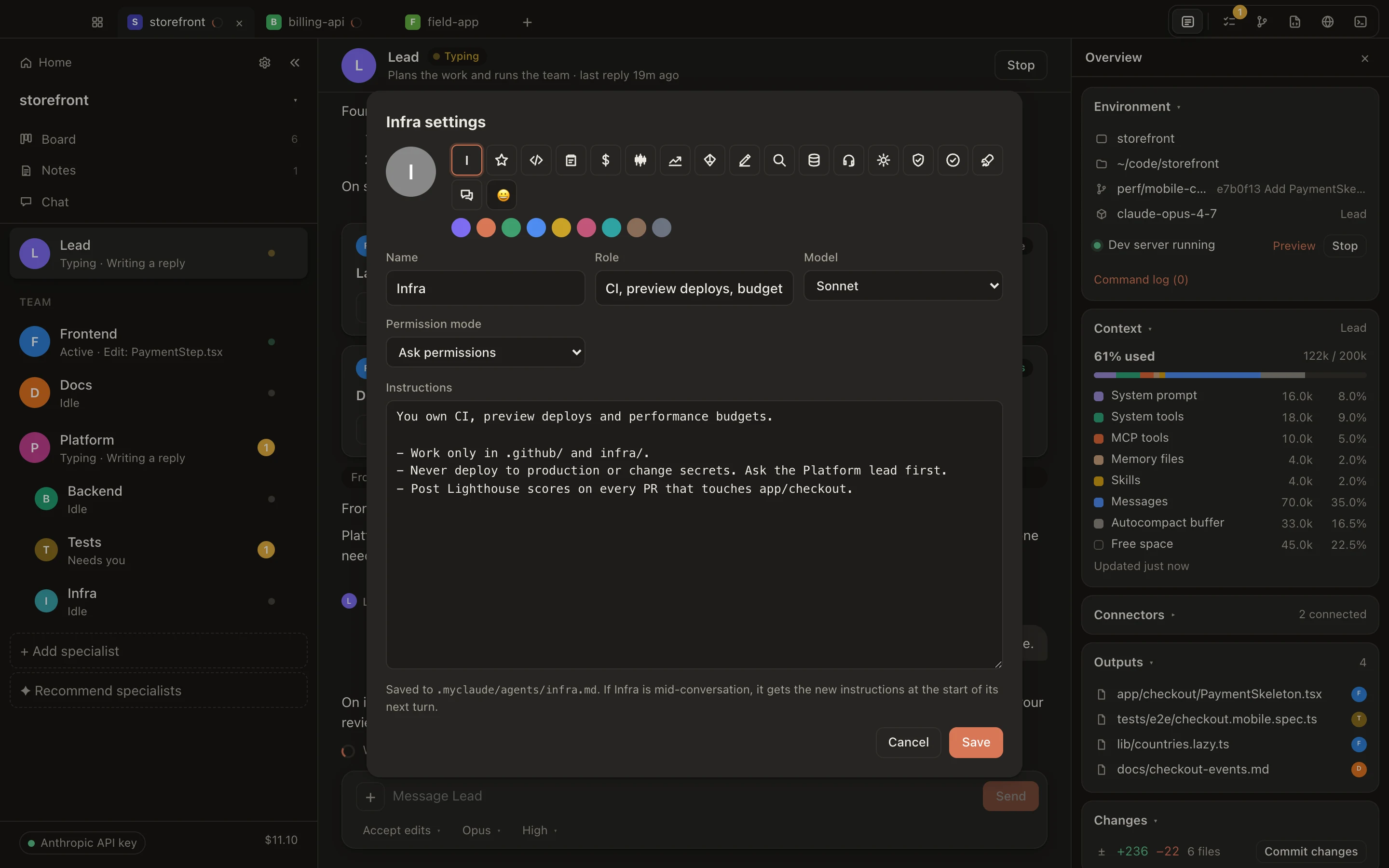
Let a writer work freely, have anything risky ask you first, keep research to reading only. Change it any time.
  • Look things up
  • Make changes to your project
  • Run tests and builds
  • Publish or anything else
Infra's settings: name, role, model Sonnet, permission mode Ask permissions, and instructions to work only in .github and infra and never deploy to production.
Fig. 05Your infrastructure agent asks before anything risky.
Review

Nothing ships without your OK.

See what changed in plain language, preview it, and approve it. Every change can be undone.
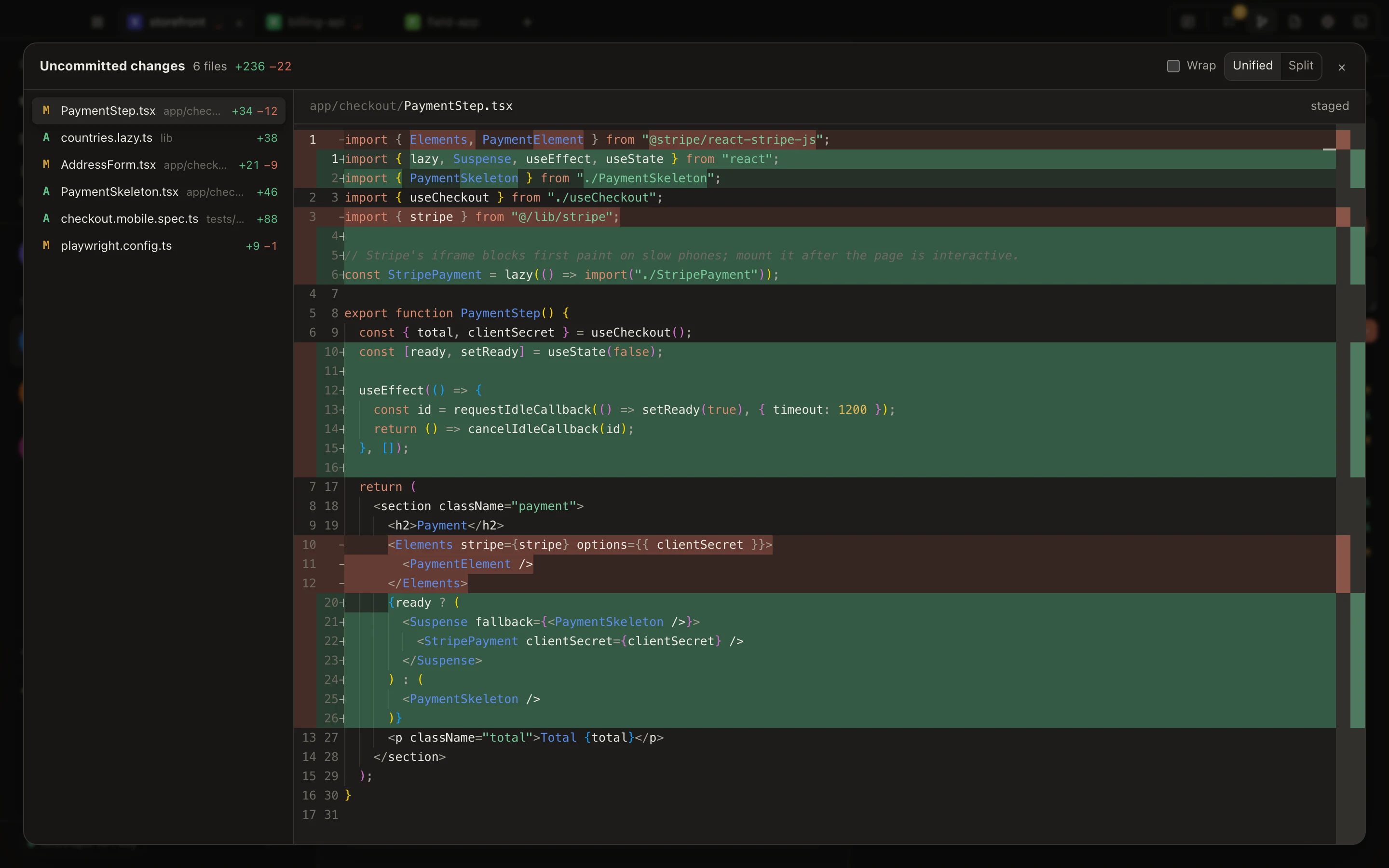
  • A clear summary of what was done and why.
  • A preview of the result before it goes live.
  • One click to approve, one click to undo.
The diff viewer reviewing six uncommitted files, showing PaymentStep.tsx deferring the Stripe iframe behind a skeleton.
Fig. 06Six files changed. The payment page now loads faster on phones.
Parallel work

Several tasks at once, no collisions.

Each task gets its own separate copy of the work, so agents don't step on each other. It only joins the rest once its checks pass and you've approved it.
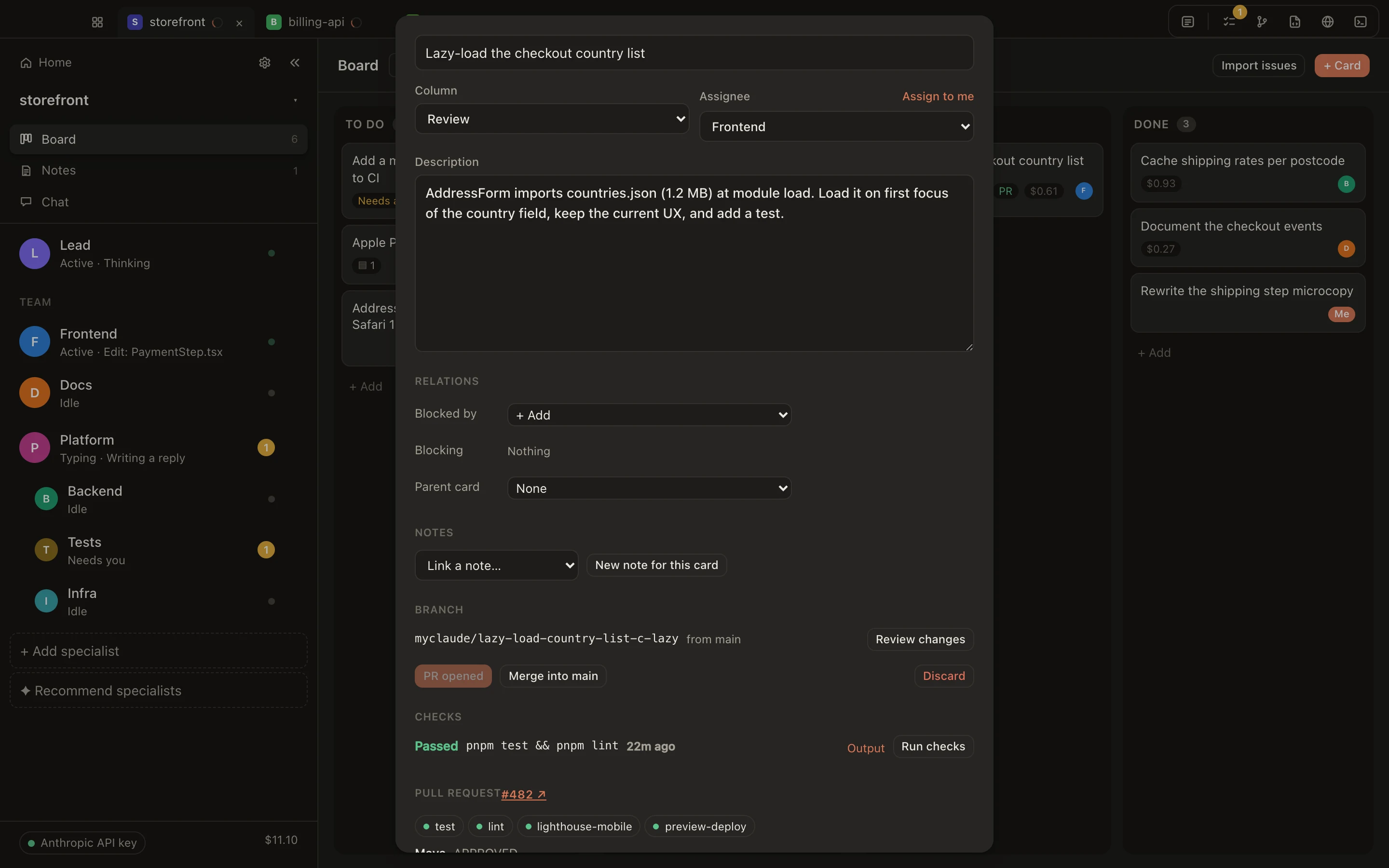
  • Checks run when an agent finishes. Anything that fails goes back to be fixed.
  • Related tasks are grouped, so a feature arrives all at once.
  • Feedback from your developer comes back to the task, ready for an agent.
A card's branch, checks and pull request: myclaude/lazy-load-country-list from main, PR opened, Merge into main, checks passed for pnpm test and pnpm lint, PR #482 with four passing checks.
Fig. 07One task, kept separate until its checks passed.
Projects

All your projects in one place.

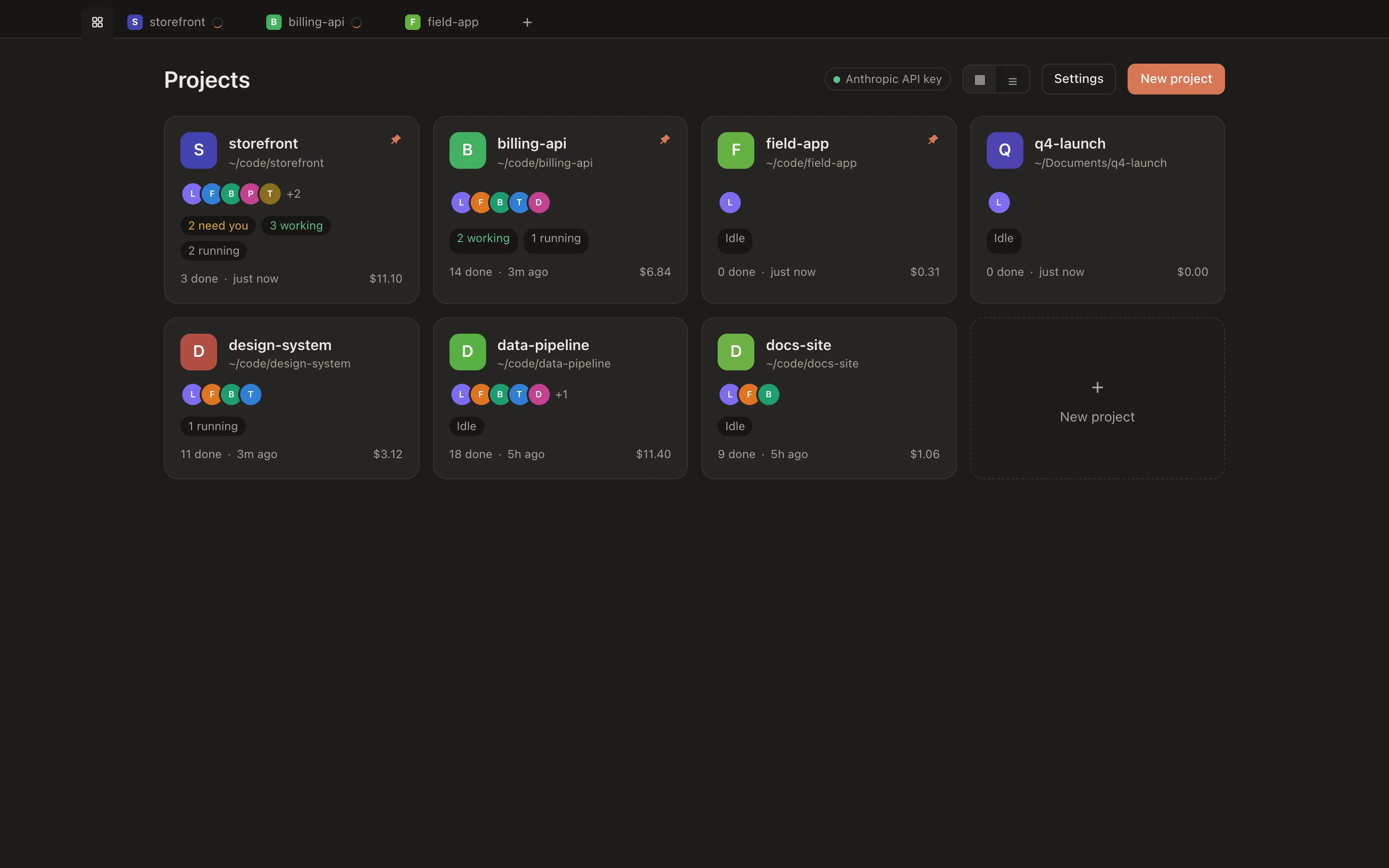
See who's working, what needs you, and what each project has cost, so nothing waits on you unnoticed.
  • Jump between projects in one click.
  • Each project keeps its own team and rules.
  • Agents keep working when the window is closed.
The Projects home: six project cards with team avatars, who's working or needs you, tasks done and cost.
Fig. 08Six projects. Two need you; one has three agents working.
Attention

It finds you when it matters.

A chime or a notification when work is done or needs your decision. It never interrupts you mid-sentence.
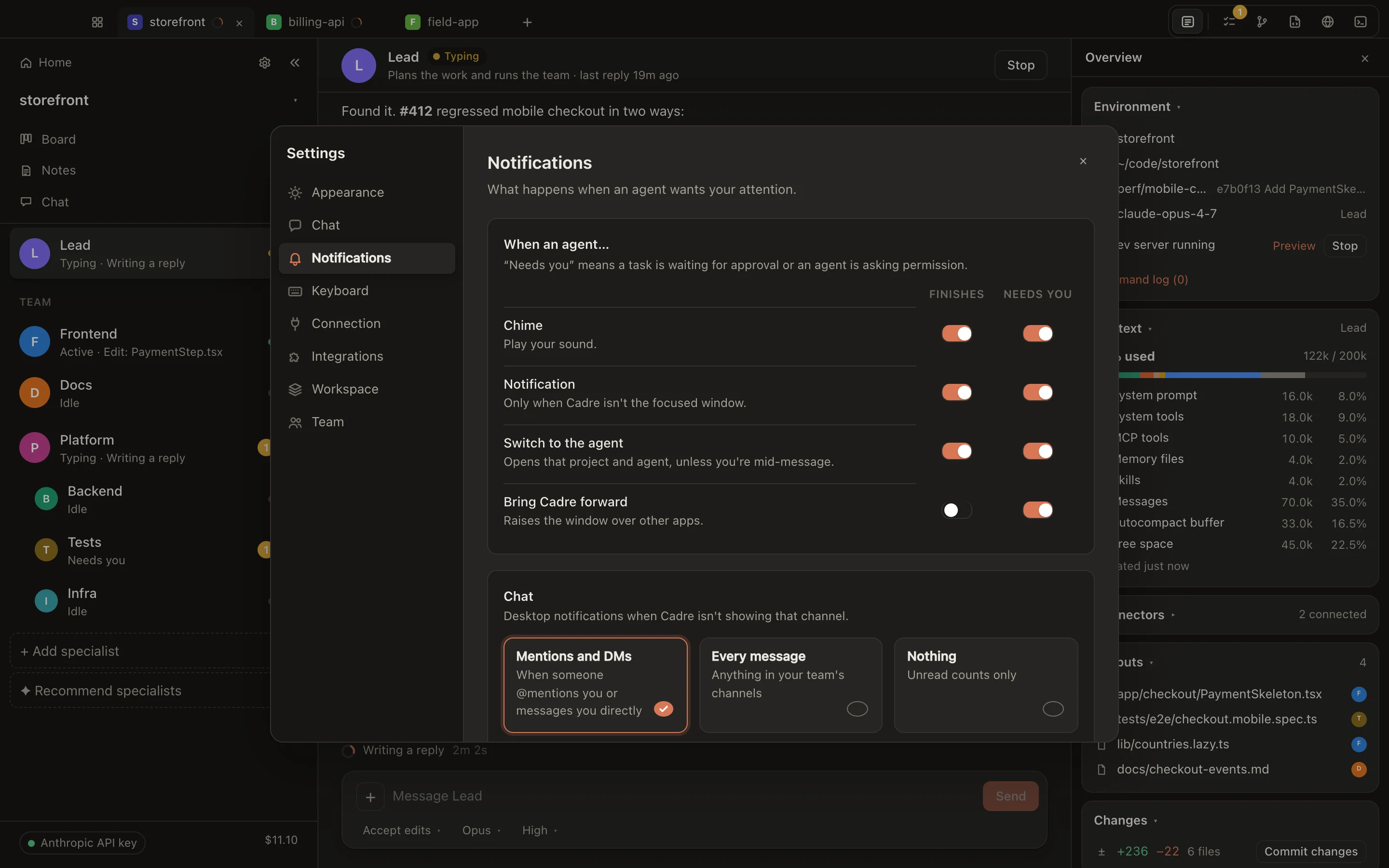
Attention settings: switches for chime, notification, switch to agent and bring to front, for when an agent finishes or needs you.
Fig. 09Separate rules for “finishes” and “needs you”, with fourteen system sounds.
Not just code

Any folder. The right team for it.

Tell Kinju what kind of project it is, or let it guess from the files. Each kind starts from its own roster, plus a project manager who keeps the board current, and the lead tailors it to what's in the folder.

Code

Web app

A site or app in the browser

  • Frontend
  • Backend
  • QA
Code

Backend or API

Services, APIs, CLIs, libraries

  • API engineer
  • Data engineer
  • QA
Code

Mobile app

iOS, Android, React Native, Flutter

  • Mobile engineer
  • Backend
  • QA
Code

Data or ML

Pipelines, notebooks, models

  • Data engineer
  • Analyst
  • Experiment reviewer
Code

Infrastructure

Cloud, Terraform, Kubernetes, CI

  • Platform engineer
  • CI/CD
  • Security reviewer
Not code

Design and creative

Brand, visuals, content

  • Creative director
  • Designer
  • Copywriter
Not code

Research and analysis

Market research, reports, writing

  • Researcher
  • Analyst
  • Editor
Not code

Business and operations

A business, or one area of it

  • Operations
  • Marketing
  • Finance
Org chart

Grow the team as the work grows. Toggle roles, or add a sub-lead.

Specialists

3agents
2parallel
1levels
And the rest

Everything around the work.

A browser for agents

Agents can look things up and check pages, and ask before clicking anything.

Connects to your tools

Hook up the services your business already uses.

Quick commands

Shortcuts for common requests, and mention anyone or any file.

Drop in files

Screenshots, PDFs and docs go straight to the team.

Cost you can see

Spend per agent and per project, before and after each task.

Picks up where it left off

Each agent remembers its work, even after a restart.

Your house rules

Set instructions once and every agent follows them.

The right AI for each job

Kinju picks the best model for each task. You don't have to.

Get started

Give your business a dev team.

Tell the lead what your business needs and see a plan and a cost estimate before anything starts. Want help? We'll set Kinju up with you on a free call.

Mac only for now · Cancel anytime